
CGPA Calculator
Combine semester grades.
Enter each semester SGPA and credits to calculate credit-weighted CGPA.
Semester Grades
Credit-weighted CGPA calculation.
Semester Trend
CGPA Calculator
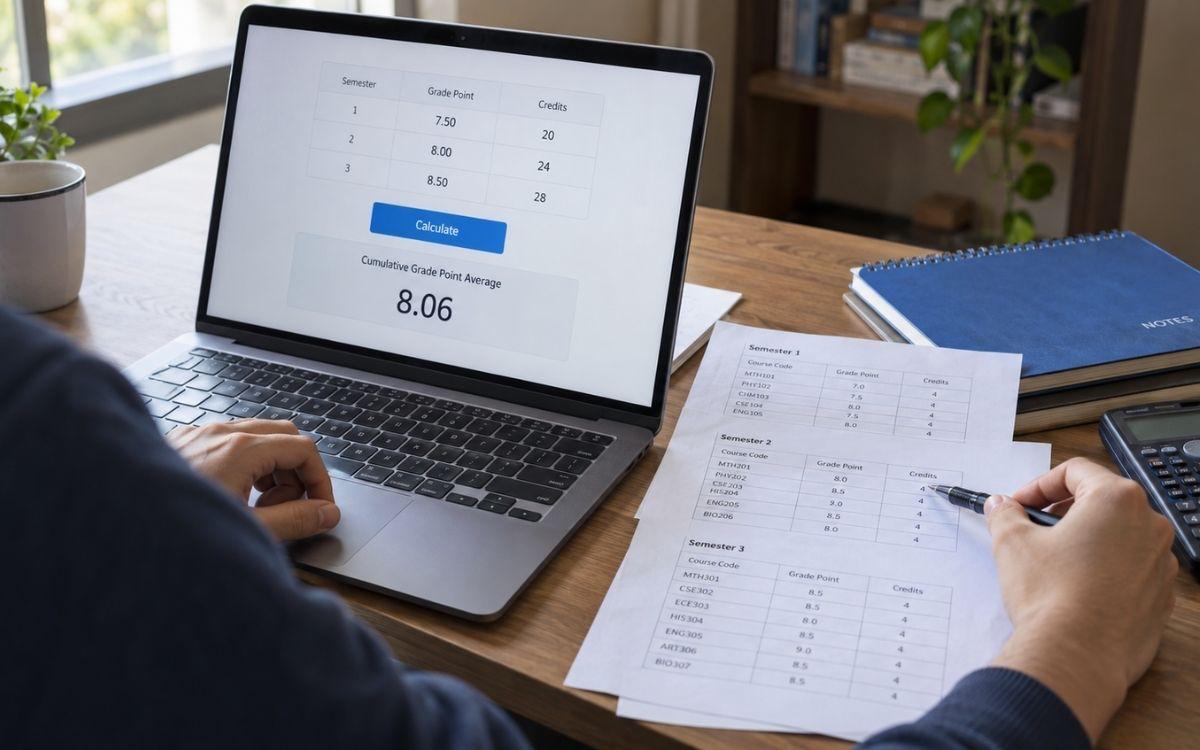
Find your overall grade point average by entering each semester’s SGPA and credits. This CGPA Calculator combines those results using credit weighting, so a semester with more credits has a greater effect on your final average.
Keep your semester result sheets nearby before you start. Use grades from the same grading scale and enter the credits included in each semester’s GPA calculation. The result can help you check your academic progress, while your official transcript remains the reference for your awarded CGPA.
How to Use the CGPA Calculator
- Label the first row with the semester you want to include.
- Enter that semester’s SGPA exactly as shown on your result sheet.
- Add the corresponding credits used to calculate that SGPA.
- Choose Add Semester for each additional term and enter its details.
- Click Calculate to find your cumulative grade point average.
Enter each semester once. If you include an existing cumulative result alongside the individual semesters already covered by it, those grades will be counted twice. For a complete academic average, include all eligible semesters in your record.
What Does CGPA Mean?
CGPA stands for cumulative grade point average. It summarizes performance across the coursework included in your academic record. SGPA, or semester grade point average, describes performance within one semester.
Think of SGPA as one part of the calculation and CGPA as the combined result. In a credit-weighted system, the combined result depends on both your semester grades and the amount of credit each semester represents. This is why two students with similar semester scores can finish with different overall averages.
CGPA Calculator Why Use This Calculator?
- Calculate your overall CGPA using semester grades and credits.
- Check how a new semester raises or lowers your cumulative average.
- Save time on manual credit-weighted calculations
CGPA Formula Using Semester Grades
To calculate CGPA from semester results, multiply each SGPA by its corresponding credits. Add those products, then divide by the total credits included:
CGPA = Sum of (Semester SGPA × Semester Credits) ÷ Total Semester Credits
For two semesters, the same formula becomes:
CGPA = [(SGPA₁ × Credits₁) + (SGPA₂ × Credits₂)] ÷ (Credits₁ + Credits₂)
Use the credits that actually contribute to the reported semester GPA. Credits earned toward graduation are not necessarily identical to GPA-counted credits. For example, a pass/fail course may provide graduation credit without contributing to the grade-point average, depending on your institution’s rules.
Worked Example: CGPA Across Three Semesters
Suppose your result sheets show these grades on a 10-point scale:
| Semester | SGPA | Credits | SGPA × Credits |
|---|---|---|---|
| Semester 1 | 7.50 | 20 | 150.00 |
| Semester 2 | 8.00 | 24 | 192.00 |
| Semester 3 | 8.50 | 28 | 238.00 |
| Total | — | 72 | 580.00 |
Divide the total weighted points by the total credits:
580 ÷ 72 = 8.055555…
Rounded to two decimal places, the cumulative result is 8.06 CGPA. Semester 3 carries more weight than Semester 1 because it includes 28 credits rather than 20.
You can use these numbers to check your manual calculation. If your university uses different rounding rules or adjusts previous grades, its transcript result may differ from this estimate.
Why Simply Averaging SGPAs Can Give the Wrong Answer
In the example above, adding 7.50, 8.00 and 8.50 and dividing by three gives 8.00. That calculation gives every semester equal weight, even though their credit totals differ. The credit-weighted answer is 8.06.
A simple average works when every included semester has the same number of GPA-counted credits and no other adjustments apply. When credit totals differ, use the weighted calculation to account for the difference.
How a New Semester Changes Your Overall CGPA
If your latest SGPA is higher than your existing cumulative average, adding that semester raises the average, assuming no changes to earlier records. If it is lower, the average falls. The size of the change depends on the new semester’s credits compared with the credits already included.
For example, a student has a 7.60 CGPA across 60 credits and then earns an 8.80 SGPA over 20 credits:
Updated CGPA = [(7.60 × 60) + (8.80 × 20)] ÷ 80 = 7.90
The strong semester raises the overall result by 0.30. To update your result using the semester rows above, retain the earlier semesters and add the new semester once.
Common Mistakes to Check Before Calculating
- Mixing grading scales: A 3.4 on a 4-point scale and an 8.2 on a 10-point scale are not directly comparable inputs.
- Using courses counts as credits: Five courses do not necessarily mean five credit hours. Use the credit values recorded by your institution.
- Entering percentages as SGPA: A mark of 82% is not an SGPA of 82. Use your reported grade-point value.
- Leaving out eligible semesters: A partial record gives the average for that selection, not necessarily your full degree CGPA.
- Rounding too early: Keep the available precision in your semester results and round the final answer as required.
Frequently Asked Questions
Can I calculate CGPA for only two semesters?
Yes. Enter both SGPAs and their corresponding credits. The result represents those two semesters; it represents your full cumulative record only if no other eligible coursework needs to be included.
Does this method work on a 4-point or 10-point scale?
The weighted-average formula works with either scale when all inputs use the same grading system. It does not convert between scales. Your inputs must also fall within the ranges accepted by the calculator.
Can I calculate CGPA without knowing my credits?
You can take a simple average if you have confirmed that every semester carries equal GPA-counted credits. If credits differ or you do not know their totals, check your result sheets before relying on an estimate.
Why does my result differ slightly from my transcript?
Your university may use more precise underlying course results than the rounded SGPAs on your result sheets. Rounding rules, excluded courses or changes to earlier grades can also affect the total. Check the underlying records if the difference matters for an application.
How should I handle repeated or failed courses?
Follow your institution’s policy. Rules for keeping, replacing or excluding grades can differ, so use updated semester results and GPA-counted credits rather than removing a course yourself. For example, MIT includes each attempt at a repeated subject in GPA; that rule should not be assumed for another institution.
Can I estimate my CGPA before the semester ends?
Yes. Enter an expected SGPA and its expected GPA-counted credits alongside your completed semesters. Treat the answer as a projection and replace the estimate when your actual result is available.
How can I convert my CGPA to a percentage?
Use the conversion rule specified by your university. The CGPA to Percentage Calculator can help when its method matches that rule. There is no single multiplier that applies to every grading system.